.webp)
Most small businesses begin their online journey with a website builder, whether it’s Wix, WordPress, or Shopify. It’s fast, affordable, and gives you control. But here’s the hard truth: not all websites succeed, even when the tools are easy to use. Many business owners launch their site only to discover later that important steps were missed, like SEO setup, mobile responsiveness, performance optimization, accessibility, or simply creating a clear user experience that converts visitors into customers.
That’s exactly why this checklist exists.
In 2026, a successful website isn’t just pages and pixels. It’s a system one that blends strategy, design, branding, speed, content, and trust. Whether you’re DIY-ing with a builder or planning to hire professionals later, this guide will help you build smarter, avoid costly mistakes, and confidently launch a website that works for your business.
You’ll walk away with a clear, practical roadmap, the same standards we follow at Pixwelz LTD when building high-performing websites for entrepreneurs and small businesses.
If you’re not sure which builder or design approach fits your business, Pixwelz can guide you from setup to success.
Step 1 - Planning & Strategy

Before choosing a template, dragging blocks, or customizing colors, you need a clear plan in place. Most website builders make it easy to jump straight into designing, but without a strategy, you’ll end up with pages that look fine yet fail to convert. Planning helps you understand what your website must do for your business, who it must speak to, and how visitors should move through it.
A strong strategy ensures every page has a purpose, every button has intent, and every visitor knows exactly what action to take. This upfront clarity also saves hours of trial and error inside the builder later.
Planning & Strategy Checklist
☐ Define your website’s purpose
Is it selling products? Generating leads? Showcasing work? Providing information? Your core goal shapes your layout, features, and content.
☐ Identify your target audience & ideal customer journey
Know who you’re speaking to and what steps they need to take before they trust your business.
☐ Decide what you want visitors to do
Should they call you, book a service, buy a product, or sign up for something? Clear actions create higher conversions.
☐ Research competitor websites for inspiration
Look at design patterns, messaging, pricing layouts, and navigation, not to copy, but to understand what works in your industry.
☐ Map out your site structure
Create a simple sitemap:
☑ Home
☑ About
☑ Services / Products
☑ Portfolio / Testimonials
☑ Blog (optional)
☑ Contact
A clean structure helps search engines understand your site and helps users navigate effortlessly.
💡Pixwelz Tip:
“Planning your website before you touch a builder saves hours and prevents redesign headaches later.”
Step 2 - Choosing the Right Website Builder

Your website builder is your foundation, and choosing the wrong one can limit design, performance, SEO, or future growth. Most small businesses start with platforms like Wix, WordPress, or Shopify because they offer templates, drag-and-drop editing, hosting, and built-in features. What matters is finding the one aligned with your goals, not just the easiest to click on today.
Think about what your business does now and what it may do six or twelve months from now. If you plan to sell products, you’ll need strong eCommerce capabilities. If you want full design control or blogging flexibility, you may want something more customizable. If you need bookings and simple brochure-style pages, another builder may be a better fit. The right decision saves you from costly migrations later.
Choosing the Right Builder Checklist
☐ Compare Wix, WordPress, and Shopify for your use case
Look at strengths, limitations, and which matches your business model, service, portfolio, or e-commerce.
☐ Ensure your builder supports SEO customization
You should be able to edit meta titles, descriptions, URLs, alt text, and structured content.
☐ Check scalability, will it grow with your business?
Consider whether the platform can support new features like blogs, bookings, store expansions, or multilingual content.
☐ Confirm integrations
Does it connect with tools you’ll need, such as payment gateways, CRM, analytics, email marketing platforms, or automation tools?
☐ Review pricing
Compare monthly fees, add-ons, app/plugin costs, hosting, domain renewals, and transaction fees where applicable.
💡Pixwelz Tip:
A builder isn’t “good” unless it fits your business goals; choose based on where you’re going, not just how easy it looks today.
Step 3 - Design & Branding Essentials
Your website is often the first impression people get of your business, and in a world where users judge credibility within seconds, branding matters more than ever. A polished, consistent visual identity helps people trust you, understand your offer quickly, and remember you when they’re ready to buy. Design isn’t just about looks; it shapes how visitors feel and how confidently they interact with your business.
Even if you’re using a template, small intentional decisions make the difference between an amateur website and one that reflects expertise. Stick to simplicity over decoration: plenty of space, predictable layouts, readable fonts, and messaging that guides people toward action. Remember, branding isn’t just a logo; it’s how every design element works together to communicate who you are.
Design & Branding Checklist
☐ Upload your logo and favicon
Place your logo clearly in the header and ensure your favicon appears in browser tabs; it builds recognition.
☐ Choose 2–3 brand colors that align with your identity
Use one primary color, one accent, and optional neutral tones to keep things clean and cohesive.
☐ Pick consistent fonts for headers and body text
Avoid mixing too many typefaces. Readability and hierarchy make your content feel professional.
☐ Design a clean, conversion-focused homepage layout
Highlight your value proposition, services, trust signals, and call-to-action above the fold.
☐ Keep navigation simple
Limit top-level menu items to 5–7 links so visitors can easily find their way.
💡Pixwelz Tip:
“Your brand’s visual identity should feel consistent across every page, from color palette to button style.”
Step 4 - Content & Page Setup
A beautiful design only works when paired with meaningful content. Your website is your digital salesperson; it needs to explain what you do, why it matters, and why someone should choose you over alternatives. Clear messaging guides visitors toward decisions, while well-structured pages help search engines understand your business.
Each page should answer the questions your audience cares about: Who are you? What do you offer? How do you help? Why should they trust you? Whether you write your own copy or collaborate with a professional later, aim for clarity over cleverness. Real examples, benefits-focused wording, and visible calls-to-action increase conversions more than fancy language.
Content & Page Setup Checklist
☐ Create high-quality copy for each main page
Pages like Home, About, Services, and Contact should explain your value clearly and reflect your brand voice.
☐ Add a blog or portfolio (optional, but powerful for SEO & credibility)
These help showcase expertise, case studies, and search-friendly content that supports organic traffic over time.
☐ Include strong, clear CTAs
Buttons like “Book a Call,” “Get a Quote,” or “Start Today” tell visitors what action to take next.
☐ Add testimonials or reviews for trust
Social proof reduces uncertainty and makes visitors feel confident choosing you.
☐ Include a contact form or booking button on every page
Never make people search for how to reach your place conversion elements, where they’re always visible.
Pixwelz Portfolio
“Pixwelz creates websites that don’t just look good, they’re built to convert. See our portfolio for real examples.”
Step 5 - SEO & Performance Optimization

Launching a site isn’t enough; people need to find it, and it needs to respond quickly when they do. Search engine optimization (SEO) helps your pages show up in Google results, while performance optimization ensures visitors don’t bounce because your site feels slow or broken. Even template-based builder sites can rank well when the essentials are implemented correctly.
Think of SEO as visibility and performance as user experience. When both are addressed, you get higher search rankings, more visitors staying on your pages, and more conversions. Builders like Wix, Shopify, and WordPress offer tools for SEO, but it’s your responsibility to configure them thoughtfully.
SEO & Performance Checklist
☐ Add page titles, meta descriptions, and keywords
These tell search engines what each page is about and influence how you appear in search results.
☐ Use image alt text for accessibility and SEO
Alt text helps screen readers while also giving Google context about your visuals.
☐ Compress and resize images for faster load times
Large images slow down websites; reducing file size improves speed and user experience.
☐ Check mobile responsiveness on multiple devices
Confirm that text, buttons, images, and forms display well on phones and tablets, not just desktops.
☐ Submit your site to Google Search Console
This lets you see indexing status, fix issues, and monitor performance directly from Google.
💡Pixwelz Tip:
“Even website builder sites can rank on Google if SEO basics are properly set up.”
Step 6 - Pre-Launch Testing
Before you hit “publish,” your website needs a thorough check because once it’s live, every mistake becomes visible to your customers. Pre-launch testing ensures your site works smoothly, loads correctly, and guides visitors without friction. Think of it as quality control: you’re looking for anything that breaks trust, blocks conversion, or disrupts the user experience.
Testing should mimic how real users will interact with your site, scrolling pages, clicking buttons, filling forms, navigating menus, and checking from their mobile device. Don’t rely on your builder preview alone; load the site on multiple devices and browsers so you can catch display or functionality issues early. This step prevents lost leads and embarrassing fixes after launch.
Pre-Launch Testing Checklist
☐ Test all forms (contact, newsletter, checkout)
Fill them out, make sure messages are sent, confirmations work, and notifications reach you.
☐ Verify links, menus, and buttons work properly
No dead pages, misrouted buttons, or missing links.
☐ Review every page on mobile and tablet
Layouts, spacing, fonts, and CTAs should work well on smaller screens.
☐ Check for spelling errors or broken visuals
Even small typos or missing images reduce professionalism and trust.
☐ Ensure tracking codes (Google Analytics, Meta Pixel) are installed
Confirm that analytics and conversions track correctly before you drive traffic.
💡Pixwelz Tip:
“Always test your website from a visitor’s perspective, not just your admin view.”
Step 7 - Ongoing Maintenance & Updates
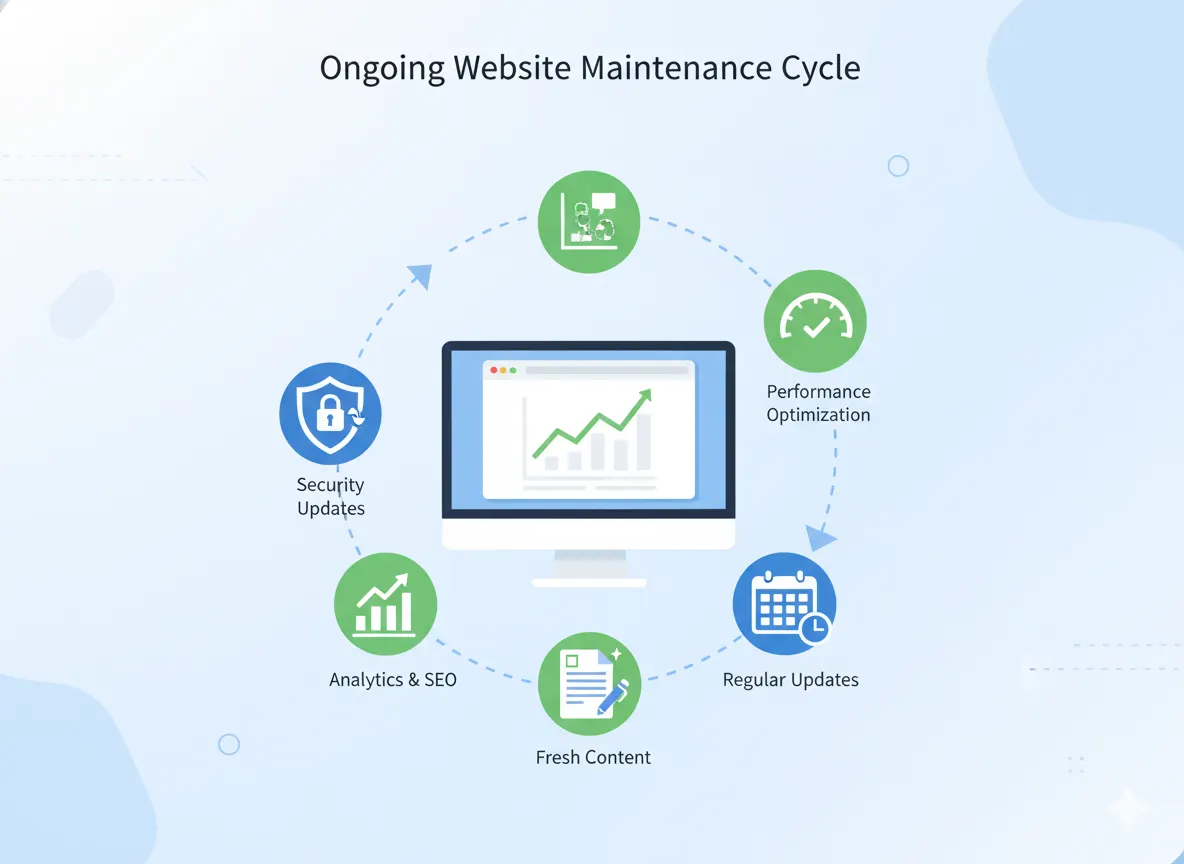
Launching your website is only the beginning. Successful businesses treat their site as a living asset, something that grows, adapts, and improves over time. Regular maintenance helps you avoid downtime, security issues, outdated content, and declining search rankings. Whether you manage it yourself or work with professionals, the key is consistency.
A site that loads fast, looks current, and reflects your business accurately builds trust and drives better results. Reviewing analytics, updating software, and refreshing content ensure your site continues to support your goals, not hold your business back.
Maintenance & Updates Checklist
☐ Back up your website regularly
Keep copies stored securely so you can recover quickly if anything breaks.
☐ Update themes, plugins, or builder software monthly
New versions improve performance, fix bugs, and patch security vulnerabilities.
☐ Monitor SEO performance with tools like Google Analytics
Track which pages get traffic, where visitors drop off, and what needs improvement.
☐ Refresh content every 3–6 months
Update service pages, add case studies, and keep messaging aligned with your business.
☐ Track conversion rates & user behavior
Watch how visitors interact with your calls-to-action and improve based on real data.
Bonus Tip:
“Your website is a living asset. Review its performance quarterly to keep growing.”
Build Smart, Grow Fast
Building a business website shouldn’t feel like guesswork. By following this checklist, you’re not just assembling pages; you’re creating a strategic asset designed to attract customers, build trust, and generate results. From planning and branding to SEO, testing, and maintenance, each step helps your site move beyond “just existing” into performing, converting, and supporting your business goals.
If you’ve already launched a website but it isn’t bringing leads, traffic, or credibility, you’re not alone. Many small business owners start with a builder but don’t know which settings, design choices, or optimizations make the difference. The good news? You can improve your website at any stage. And you don’t have to do it alone.
At Pixwelz LTD, we help businesses build smarter, turning templates into growth engines with better content, design, SEO, and conversion systems.
“Need help turning your checklist into a real, professional website?
Pixwelz helps small businesses build modern, SEO-friendly sites that convert.”
.svg)
.svg)
.svg)
.svg)