The modern digital marketplace has made having a professional website a non-negotiable business necessity, regardless of your size, niche, or target audience. However, one of the biggest challenges most businesses face, especially those with little or no technical background, is selecting the right platform to build that website. With dozens of website builders promising fast setup, drag-and-drop design, mobile-friendly layouts, and built-in marketing tools, making a confident decision can feel nearly impossible.
This guide will help you understand website builders in-depth, compare platforms, avoid major mistakes, and select the best solution tailored to your business goals.
Why Choosing the Right Website Builder Matters
Many business owners assume that all website builders are basically the same as long as they offer templates, user-friendly editing, and hosting. Unfortunately, this mindset leads to rushed decisions that may only work for today, but not for long-term growth.
Here’s why your choice matters long-term:
✔ Brand Identity & Customer Trust
Your website represents who you are. A cheap, outdated, or poorly-designed site negatively impacts credibility and conversion. Some builders offer limited customization, resulting in a brand that resembles many others.
✔ SEO & Rankings
Search engines decide how visible your business is online. If your builder doesn’t provide SEO features (schema, URL structure, server speed, meta control, code cleanliness), ranking becomes harder regardless of your content quality.
✔ Website Speed & Performance
A slow website increases bounce rate, leads to abandoned carts/forms, and can hurt ad performance. Your platform must support fast loading time, CDN, caching, and optimized hosting.
✔ Growth, Scaling & Future Features
You may begin with a simple website, but later want to add:
• Online booking system
• Membership features
• CRM or marketing integrations
• eCommerce store
• Multi-language support
• Third-party software or API
Some builders are unable to expand beyond basic features.
✔ Cost Efficiency
A low-cost builder today can become expensive tomorrow if:
• You require premium add-ons
• You outgrow storage or features
• You must hire developers for migration
Choosing wisely saves thousands in redesigns.
What to Consider Before You Choose a Website Builder
Selecting a platform becomes easier when you understand your needs clearly. Instead of comparing dozens of features immediately, first answer these fundamental questions.
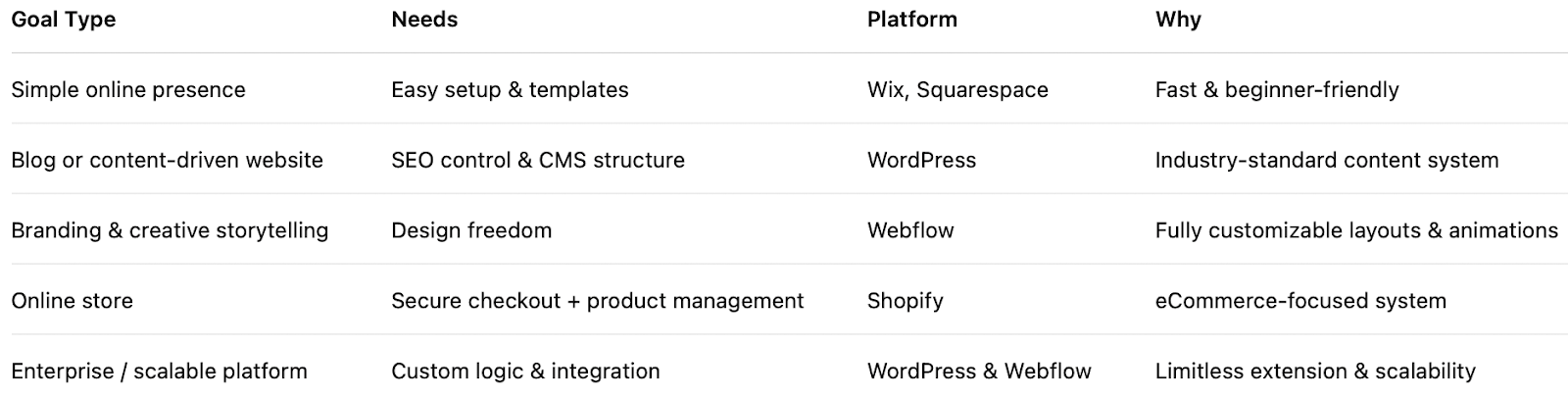
1️⃣ Your Business Goals
Your website must serve a specific purpose, not just exist online. Think of your website as a tool, not a digital brochure.
2️⃣ Budget & Scalability
Budget planning should consider more than launch cost. The wrong decision can trap you into recurring expenses, limited upgrades, or costly migrations later.
Cost Elements to Consider:
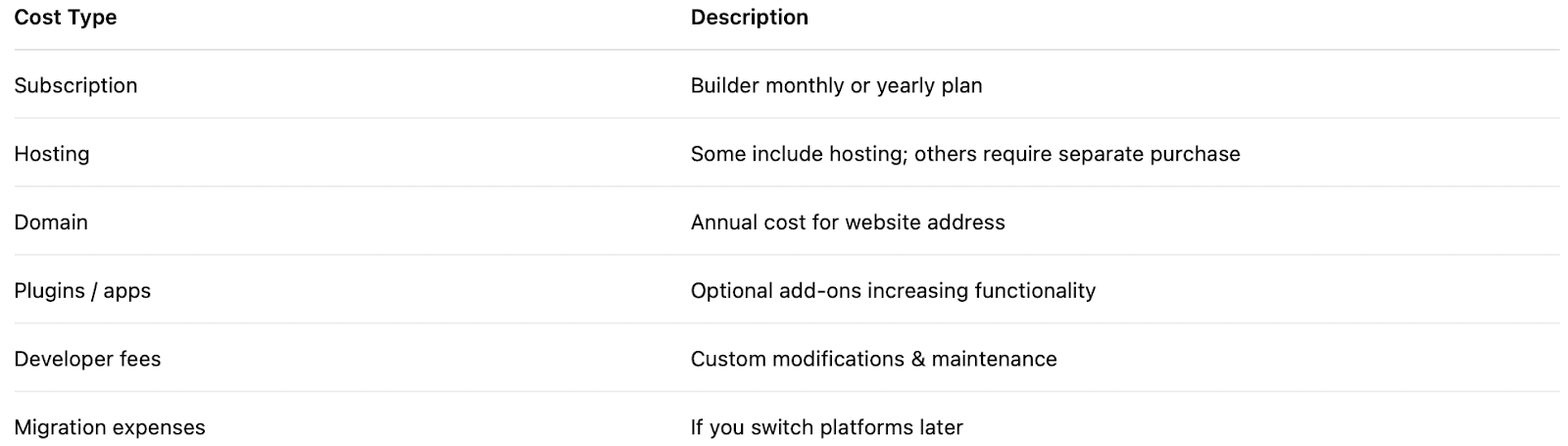
Many people choose a cheap plan and regret it once they need advanced features like memberships, automation, analytics, or multi-language support.
Long-term thinking always reduces costs.
3️⃣ Ease of Use vs Flexibility
When choosing a website builder, one of the most important decisions you’ll face is determining what matters more for your business: ease of use or flexibility and full customization. While almost every platform today promotes “easy website creation,” the level of control you get varies greatly. Some platforms are designed to help beginners build a website quickly without technical skills, while others offer complete creative and functional freedom but come with a steeper learning curve.
Website platforms fall under three categories:

To decide, ask yourself:
• Do I want plug-and-play simplicity?
• Will I need custom features later?
• Will I hire an agency or maintain it alone?
The more unique your brand vision, the more flexibility you’ll need.
4️⃣ Design Capabilities & Branding Options
Your website’s design plays a crucial role in how your audience perceives your brand. A strong design can instantly communicate professionalism, credibility, and trust, while a poorly structured or outdated design can turn visitors away within seconds. Beyond visual appeal, your website must also accurately represent your brand identity, support ease of navigation, and offer a smooth experience across all devices.
Your website must feel like your brand, not a template.
Look for the following design features:
• Mobile-responsive design tools
• Header, footer, and global styling control
• Typography and brand-color customization
• Animation or interaction support
• Image, video, and media optimization
• Ability to build or modify custom layouts
Platforms like Webflow and WordPress (with page builders such as Elementor, Bricks, or Gutenberg) offer significantly more control than template-locked platforms.
5️⃣ SEO & Performance Considerations

Search Engine Optimization (SEO) and website performance are two of the most important factors to consider when selecting a website builder. Even if you have a beautifully designed website, it won’t generate meaningful results unless potential customers can find it, access it quickly, and interact with it smoothly. Different website builders offer different levels of control and capability when it comes to optimizing your content for search engines, improving site speed, and integrating with analytical tools.
Minimum SEO requirements:
✔ Control over page titles, meta descriptions, and slugs
✔ Ability to create clean URL structures
✔ Schema markup / structured data support
✔ Fast hosting & caching tools
✔ Image compression
✔ Integration with analytics & tracking tools (GA4, GSC, Meta Pixel)
✔ Ability to create blogs easily
6️⃣ Support, Maintenance & Community
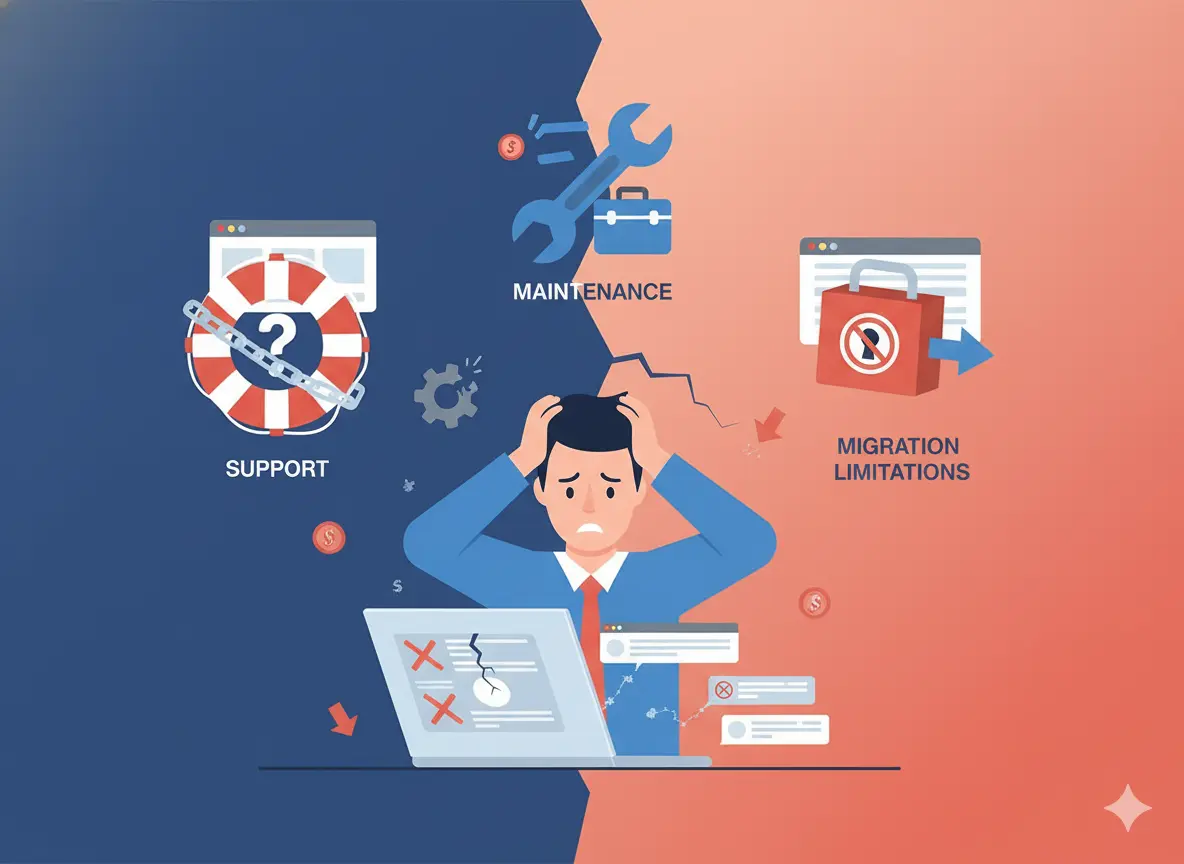
Support and maintenance are often overlooked when choosing a website builder, but they are critical to ensuring that your website remains secure, functional, up-to-date, and problem-free over time. A website is not a “build once and forget” asset; it requires ongoing care, just like any important business tool. Without reliable support or proper maintenance structures, your website may encounter issues such as broken functionality, slow performance, security vulnerabilities, plugin conflicts, or compatibility problems after updates.
Your long-term experience depends heavily on support.
Consider:
• Does the platform offer 24/7 chat or ticket support?
• Are updates automatic or manual?
• Is there a large community with tutorials?
• Can you easily find developers if needed?
Wix, Squarespace, and Shopify handle most updates automatically. WordPress provides unlimited community and developer support, but requires occasional maintenance.
Popular Website Builders Compared (Detailed)
.webp)
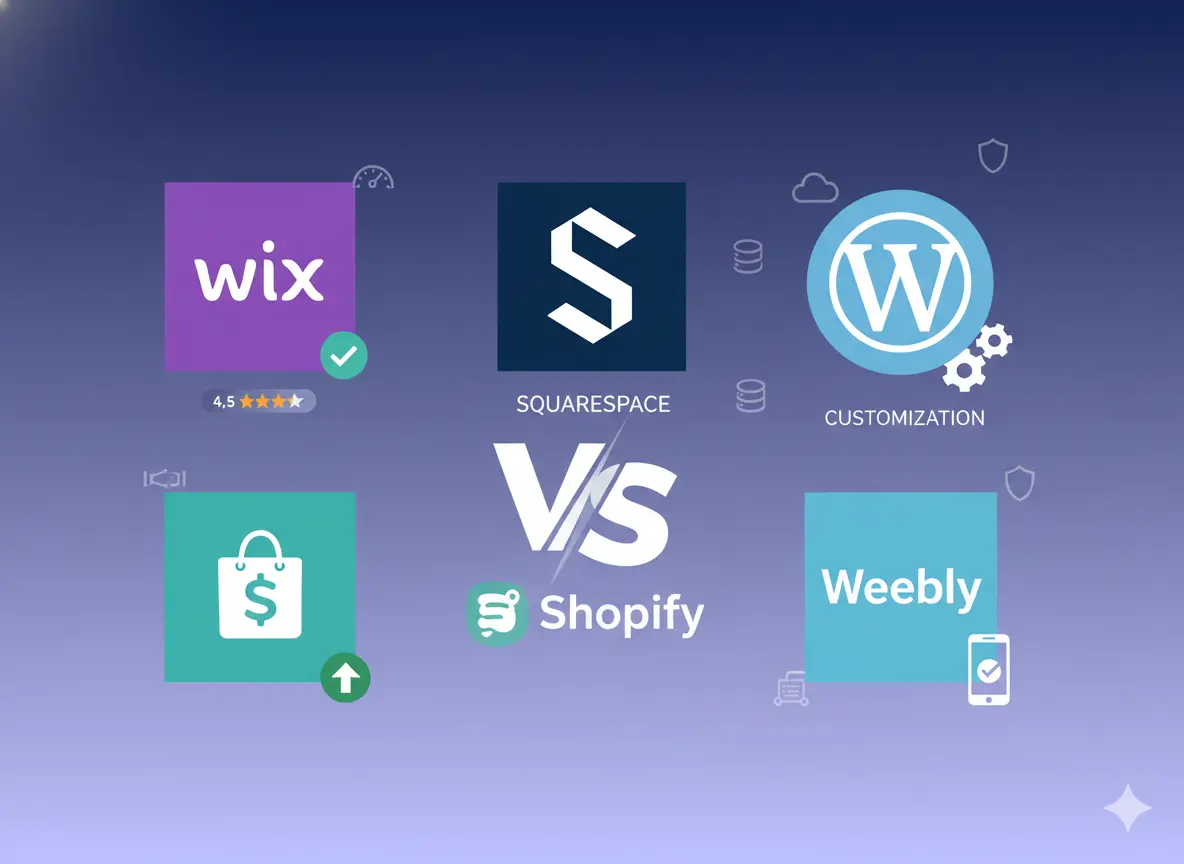
With the sheer number of website builders available today, it’s essential to compare the most popular platforms side-by-side so you can understand their strengths, weaknesses, and best use cases. Below, we break down how five leading builders stack up and what that means for your business.
WordPress (Recommended for Most Businesses)
.webp)
✔ Pros of WordPress
1️⃣ Ultimate Flexibility (Build Any Type of Website)
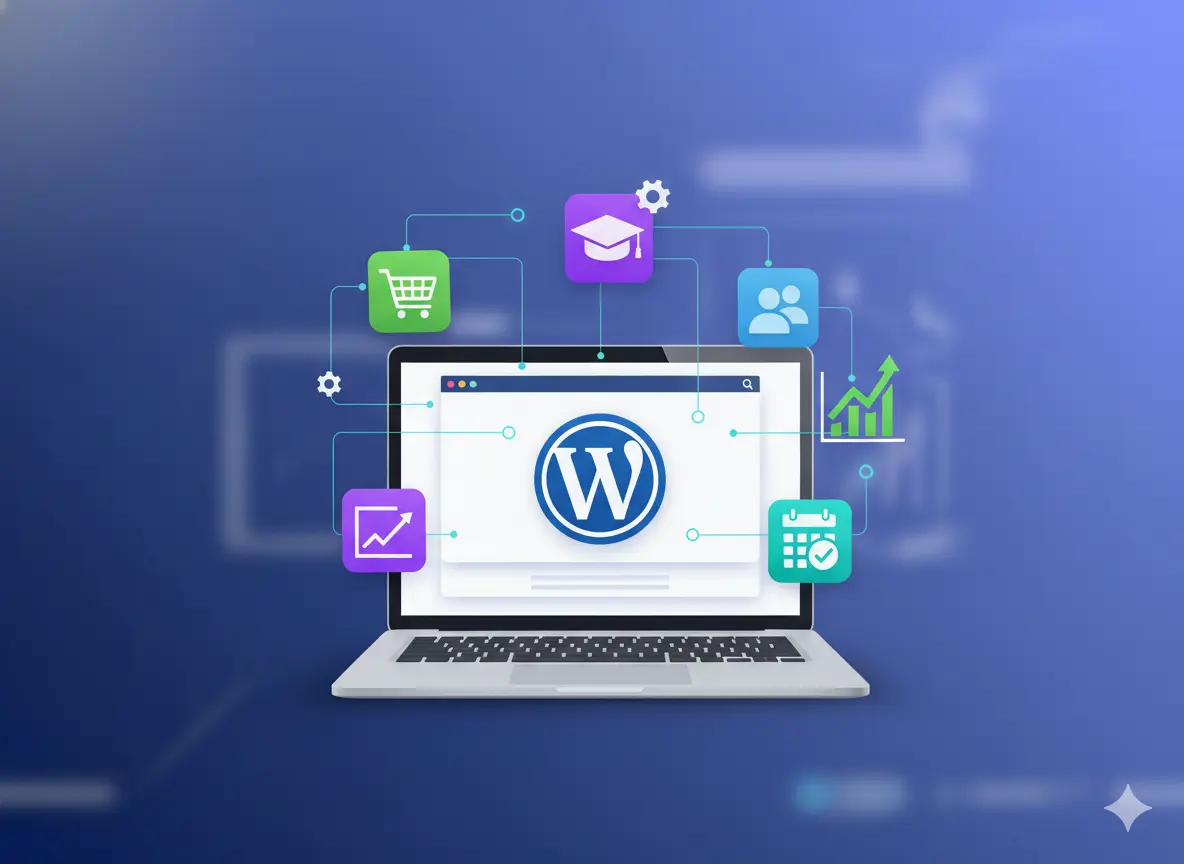
WordPress allows you to create any kind of digital experience from blog-driven sites and service pages to eCommerce stores, learning platforms, membership sites, booking systems, and custom portals.
2️⃣ Highly Scalable for Small & Large Businesses
You can start small (a basic website) and scale big (an international or multi-service website) without changing platforms.
As your audience grows, you can add:
• Advanced content structures
• Multiple landing pages
• Automation workflows
• Membership systems
• Multi-language content
• Additional marketing tools
• Custom dashboards
This makes WordPress a long-term solution, not a temporary one.
3️⃣ SEO-Friendly Architecture
Search engine optimization is one of the strongest advantages of WordPress.
It offers complete control over:
• Metadata & headings
• URL structure
• Schema markup
• Canonical tags
• Page speed optimization
• Content organization
• Internal linking
• Indexing rules
With the help of professional SEO plugins like Rank Math or Yoast, WordPress becomes one of the most powerful SEO-ready platforms available.
4️⃣ Theme & Design Freedom
Brands can select from thousands of high-quality themes or build their own using page builders like:
• Elementor
• Divi
• Bricks Builder
• Gutenberg (native block editor)
This allows for complete creative control, unlike template-locked builders.
🔴 Cons of WordPress
1️⃣ Requires Some Technical Knowledge
While you don’t need to be a developer, WordPress is not fully plug-and-play like Wix or Squarespace. You must handle or outsource things like:
• Hosting setup
• Theme configuration
• Plugin installation
• Updates & backups
• Security monitoring
• Optimization & performance tuning
This makes it less ideal for people who want a “build it and forget it” solution.
2️⃣ Too Many Plugin Dependencies Can Cause Issues
If poorly managed, installing excessive plugins can lead to:
• Slower performance
• Conflicts or errors
• Security risks
• Extra maintenance
However, this is avoidable with expert guidance and quality-controlled plugin selection.
3️⃣ Requires Ongoing Maintenance
Updates for themes, plugins, and WordPress core are necessary to ensure security, which requires periodic checks.
Wix
Wix is a beginner-friendly, all-in-one website builder designed to help users create and launch websites quickly without needing technical or coding knowledge. It is popular among freelancers, hobbyists, and small business owners who want a professional-looking website and prefer a simple drag-and-drop editing experience. With built-in hosting, templates, apps, and customer support, Wix removes much of the technical setup that other platforms require, making it a convenient starting option for people with limited time or technical skills.
✔ Pros of Wix
1️⃣ Very Easy to Use (Beginner-Friendly Interface)
Wix offers a highly visual, drag-and-drop website editor that works similarly to designing a flyer or presentation. You can move text, images, buttons, and sections around freely without worrying about code or complex settings. The learning curve is minimal, making it ideal for first-time website owners.
2️⃣ All-in-One Website Solution
Wix takes care of hosting, security, updates, and basic website performance for you. This means you don’t have to manage plugins, servers, or external services; everything you need to launch is already inside the platform. It also offers a built-in app marketplace where you can add essential features like booking, chat widgets, forms, social feeds, and email marketing.
3️⃣ Wide Collection of Templates & Design Tools
Wix provides hundreds of ready-made templates for different industries, making it easy to choose a layout that matches your brand type. Additionally, the Wix ADI (Artificial Design Intelligence) tool can build a website for you automatically through a guided questionnaire, a great feature for non-tech users.
🔴 Cons of Wix
1️⃣ Limited Scalability for Growing Businesses
While Wix is excellent for beginners, it can become restrictive once your business expands and requires more advanced or custom functionality. For example, it’s not ideal for very large websites, complex automation setups, or advanced business systems. If your site outgrows Wix, migrating to another platform like WordPress or Webflow can be time-consuming and costly, as design export and code portability are limited.
2️⃣ Limited Advanced SEO Control
Although Wix includes basic SEO tools, it has certain limitations when it comes to URL structure control, advanced schema, site architecture, and large-scale content optimization. For small websites, this is usually fine, but for businesses planning to rely heavily on organic traffic, competitive industry rankings, or content marketing, platforms like WordPress or Webflow offer more long-term SEO advantages.
3️⃣ Restricted Custom Code Flexibility
You can add custom code in Wix, but not at the same depth as developer-focused platforms. This means advanced customizations, third-party integrations, custom logic, or tailored automations may be challenging or impossible without workarounds.
Shopify
Shopify is widely used by small online shops, dropshipping businesses, print-on-demand stores, brand retailers, and even large eCommerce operations. If selling online is the core of your business, Shopify is one of the strongest platforms available.
✔ Pros of Shopify
1️⃣ Built Specifically for Online Selling
Unlike other builders that add eCommerce features through plugins, Shopify was designed as an eCommerce platform from the ground up. It offers:
• Product pages and variants (size, colour, etc.)
• Inventory management
• Abandoned cart recovery
• Discount and coupon systems
• Secure checkout and tax calculation
• Multi-channel selling (Meta, Instagram, TikTok, Amazon, etc.)
• POS (point-of-sale) system for physical stores
This makes Shopify extremely reliable and scalable for businesses focused primarily on selling.
2️⃣ Excellent App and Integration Ecosystem
Shopify integrates with thousands of third-party services, including payment gateways, marketing tools, shipping carriers, CRM, dropshipping suppliers, logistics apps, and analytics platforms. This ecosystem allows you to build a customized eCommerce workflow without needing custom development.
3️⃣ Secure, Hosted & High-Performance Platform
Shopify automatically manages hosting, SSL security, backups, and uptime, meaning you don’t have to handle technical maintenance. The platform is also optimized for fast loading speeds, which is crucial for e-commerce conversion rates.
🔴 Cons of Shopify
1️⃣ Monthly Subscription + Additional Fees
Shopify charges a recurring subscription fee, and many advanced features require paid apps. Additionally, if you use payment gateways other than Shopify Payments, transaction fees may apply, which can become expensive at scale.
2️⃣ Limited Design Flexibility for Content-Focused Sites
While Shopify is excellent for product-driven sites, it’s less flexible for brands needing a heavy focus on blogging, long-form content, learning platforms, or custom user experiences. You can still create content, but customization options and content structure are more rigid compared to WordPress or Webflow.
3️⃣ Custom Features May Require Developer Assistance
Although Shopify is user-friendly, deeper customizations often require Liquid (Shopify’s templating language), meaning complex changes may not be DIY-friendly.
Squarespace
Squarespace is a popular all-in-one website builder known for its visually stunning, professionally designed templates and easy-to-use editor. It focuses heavily on design quality and offers modern, minimalist layouts that are especially appealing to creatives, small businesses, and personal branding websites. With built-in hosting, security, and essential marketing features included, Squarespace makes it easy for users to launch a website without needing plugins, coding knowledge, or external services.
✔ Pros of Squarespace
1️⃣ Beautiful, Professionally Designed Templates
Squarespace is widely recognized for having some of the most visually appealing templates among all website builders. These templates use clean typography, strong layout composition, and mobile-responsive grids, making them suitable for showcasing photography, artwork, brand visuals, and storytelling-based content. Many templates are specifically optimized for portfolios, galleries, menus, and product displays.
2️⃣ Easy Setup and User-Friendly Editor
Squarespace provides a streamlined, intuitive editor that is simpler than many advanced builders. You can modify pages, add sections, insert images, embed videos, and build galleries without technical skills. Because most features are built-in, users don’t have to deal with plugins or complex settings.
3️⃣ All-in-One Platform With Built-In Essentials
Squarespace includes hosting, security, SSL certificates, templates, and design tools out of the box. It also comes with built-in tools such as:
• Email marketing and newsletters
• Appointment scheduling (via Squarespace Scheduling)
• Basic eCommerce support
• Blogging functionality
• Membership & paywall options
This makes it ideal for users who prefer simplicity and don’t want to manage third-party add-ons.
🔴 Cons of Squarespace
1️⃣ Limited Extensions & Integrations
Unlike platforms with large ecosystems (such as WordPress or Shopify), Squarespace offers a smaller marketplace for add-ons and third-party integrations. If your website ever requires complex automation, advanced marketing systems, custom database features, or specialized plugins, you may hit limitations that require switching platforms.
2️⃣ Less Flexible for Advanced Customization
Squarespace templates look great, but deep customization beyond layout presets can be challenging, especially for users who want fully unique designs, custom animations, or unconventional layouts. While some CSS customization is possible, it’s not designed for developer-level flexibility like Webflow or WordPress.
3️⃣ Not Ideal for Large or Complex Websites
For businesses that require enterprise-level features, large content libraries, advanced SEO architecture, or custom functionality, Squarespace may feel restrictive as the website grows.
Webflow
Webflow is widely used by agencies, startups, SaaS companies, and high-end brands that need a premium, custom, high-performance website without going fully into manual coding or hiring a large development team. It is also a popular choice for designers who want to translate creative concepts into live websites without relying on external developers.
✔ Pros of Webflow
1️⃣ Full Creative & Structural Design Freedom
Webflow offers an unmatched level of visual customization. You are not restricted to template structures; you can design everything from headers to animations to responsive layouts at a professional level. Elements can be positioned using CSS-style controls such as flexbox and grid, allowing you to achieve layouts that are impossible or difficult on traditional “template-based” builders.
2️⃣ High Performance & Clean Code Output
Unlike many builders that produce bloated or inefficient code, Webflow generates clean, semantic code, which contributes to better site performance, faster load times, and improved SEO potential. Built-in hosting is powered by fast global infrastructure, making it suitable for performance-focused brands.
3️⃣ Scalable With CMS & Advanced Features
Webflow includes a powerful CMS (Content Management System) that allows teams to create dynamic content such as blogs, portfolios, case studies, product listings, and directories without needing multiple plugins. Users can also integrate animations, interactions, memberships, eCommerce, and third-party tools, making it both scalable and versatile as business needs evolve.
🔴 Cons of Webflow
1️⃣ Learning Curve for Beginners
Because Webflow offers design and development-level control, it is not as beginner-friendly as Wix or Squarespace. Users must understand basic web design principles, including spacing, layout, responsiveness, and content structure. Although you don’t need to be a coder, a solid understanding of how websites are built will help significantly.
2️⃣ Advanced Features May Require Professional Setup
Although Webflow is powerful, some features, such as complex integrations, custom CMS structures, or dynamic logic, may benefit from assistance from a professional designer or developer, especially for business-critical projects.
Comparison Table
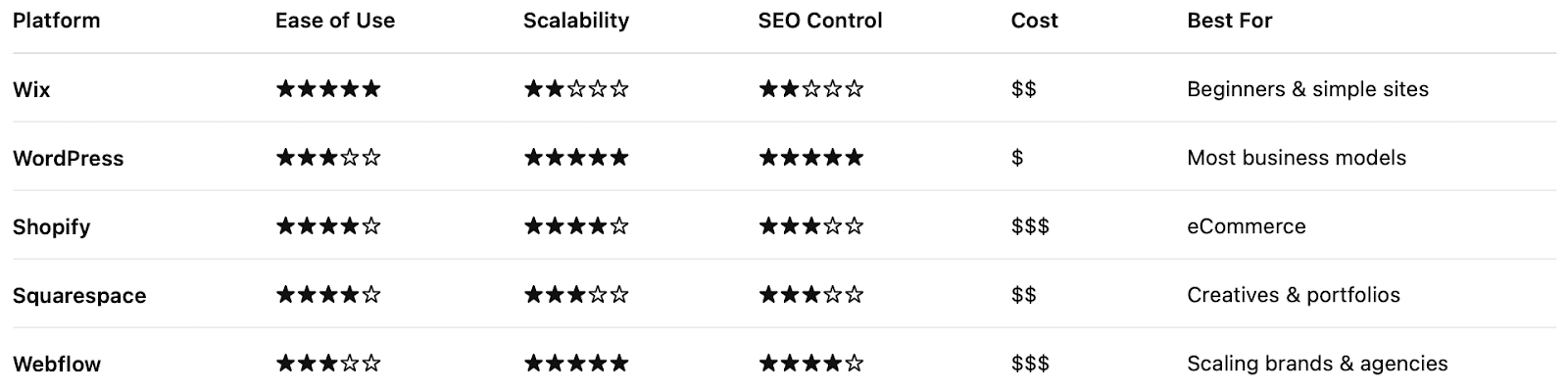
How to Choose Based on Business Type
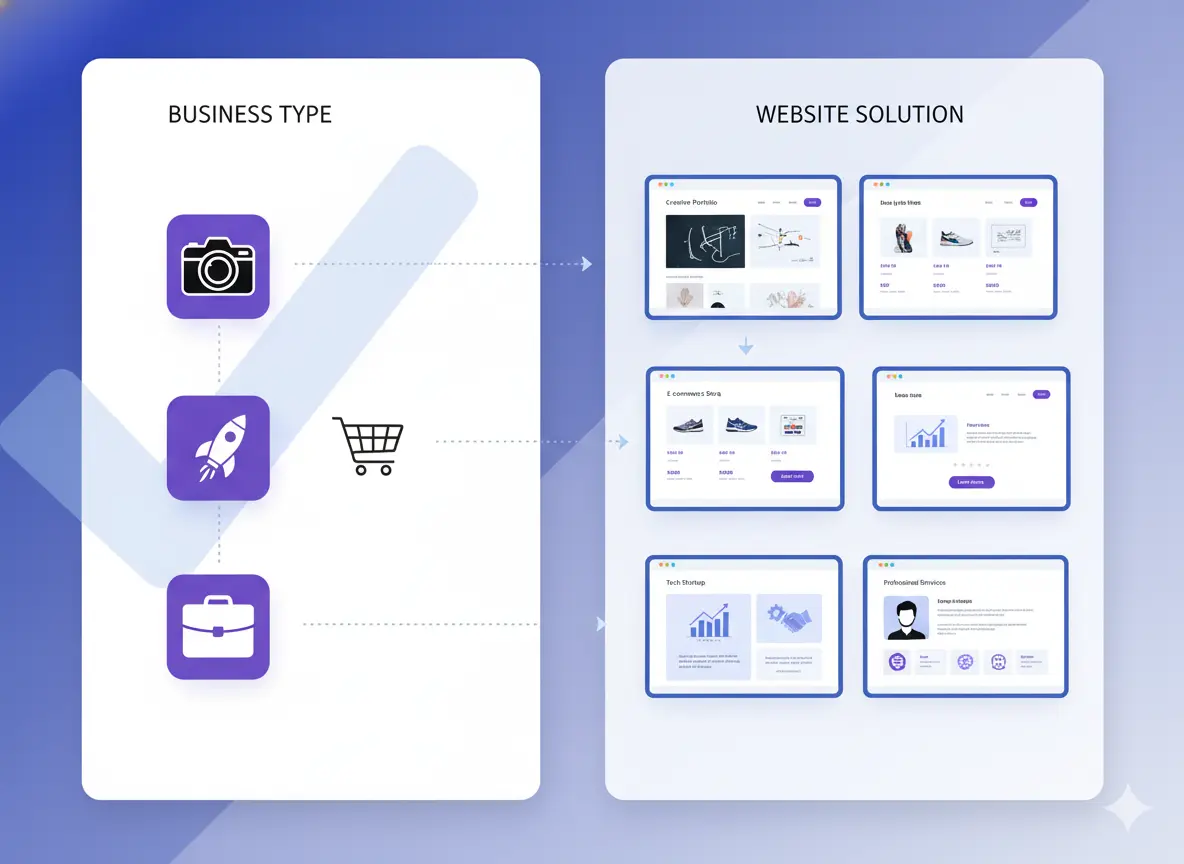
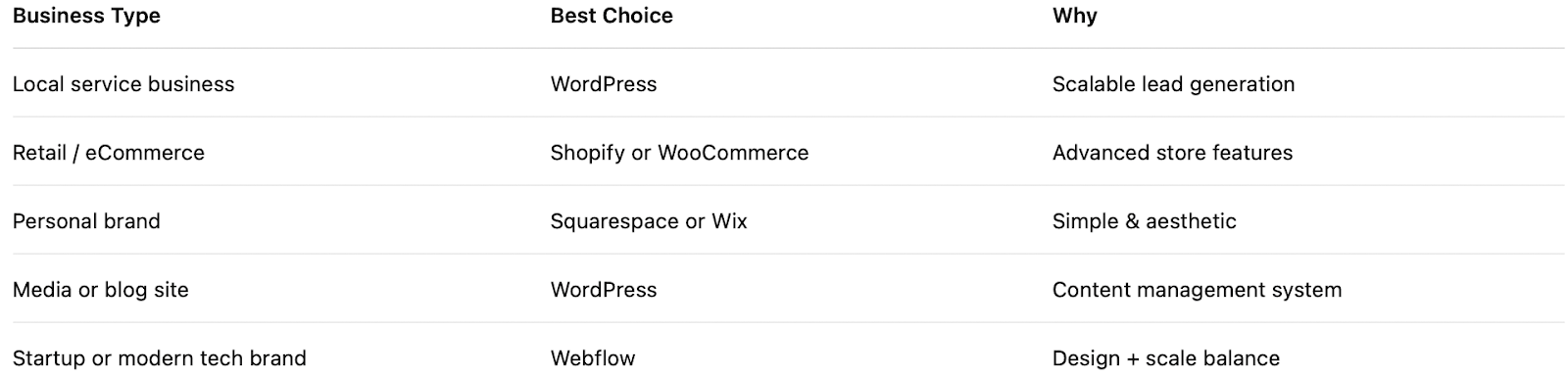
Once you understand what different website builders offer, the most effective way to finalize you decide to match each platform to your specific business model, long-term strategy, and technical comfort level. Not all businesses have the same website goals. A portfolio site has very different needs compared to an online store or a rapidly scaling tech brand. That’s why the best website builder is not the most popular one, but the one that aligns most closely with how your business operates today and how it plans to evolve in the future.
1️⃣ Service-Based Businesses (Consultants, Agencies, Local Services)
If your business revolves around generating leads, not immediate product sales, your website needs to focus on credibility, conversion pathways, and SEO. Features such as landing pages, forms, booking systems, case studies, and blog content become more important than eCommerce features.
Best Choices:
⭐ WordPress - best long-term SEO and customization for service funnels
⭐ Webflow - best modern branding and smooth, high-quality UX
Choose these if:
✔ You need a unique design for brand positioning
✔ You want to scale content (blogs, case studies, landing pages)
✔ SEO and organic lead generation are part of your growth plan
2️⃣ eCommerce & Product-Based Businesses (Retail, Dropshipping, DTC)
.webp)
If your primary business activity is selling products, you need a builder that makes it easy to manage inventory, accept secure payments, integrate shipping tools, and automate sales workflows.
Best Choices:
⭐ Shopify - best for pure eCommerce and scaling
⭐ WooCommerce (WordPress) - best if you need full customization and a content-rich store
Choose these if:
✔ Online sales are your main revenue source
✔ You plan to scale to multi-channel selling
✔ You want automation, abandoned cart recovery, coupons, etc.
3️⃣ Creative or Personal Brands (Photographers, Designers, Artists)
.webp)
If your website’s primary goal is to showcase visual work, aesthetics and layout flexibility are top priorities. The site must look professional, modern, and engaging with minimal technical setup.
Best Choices:
⭐ Squarespace - best templates & portfolio layouts
⭐ Webflow - best custom-crafted visual storytelling
Choose these if:
✔ You care deeply about visual presentation
✔ Your website acts as an online portfolio or digital showroom
✔ You rely on first impressions and brand aesthetics
4️⃣Scalable, Brand-Driven, or Complex Digital Businesses
If you expect your website to evolve into something distinct, interactive, or app-like, you want a platform built for flexibility and custom development.
Best Choices:
⭐ Webflow - closest to custom development without full coding
⭐ WordPress - unlimited extensibility through custom themes & plugins
Choose these if:
✔ You anticipate adding advanced features over time
✔ Your brand positioning requires unique designs and user journeys
✔ You may later integrate external systems or automation tools
Common Mistakes When Choosing a Website Builder

Choosing a website builder is not just a technical decision; it’s a business strategy decision that can significantly influence your brand, marketing performance, revenue growth, and operational workflow. Yet, many business owners make platform choices based on short-term convenience, initial cost, or aesthetic templates, without considering long-term consequences. This often leads to expensive redesigns, migrations, or complete rebuilds within 6–24 months.
1️⃣ Focusing Only on Price, Not Features or Value
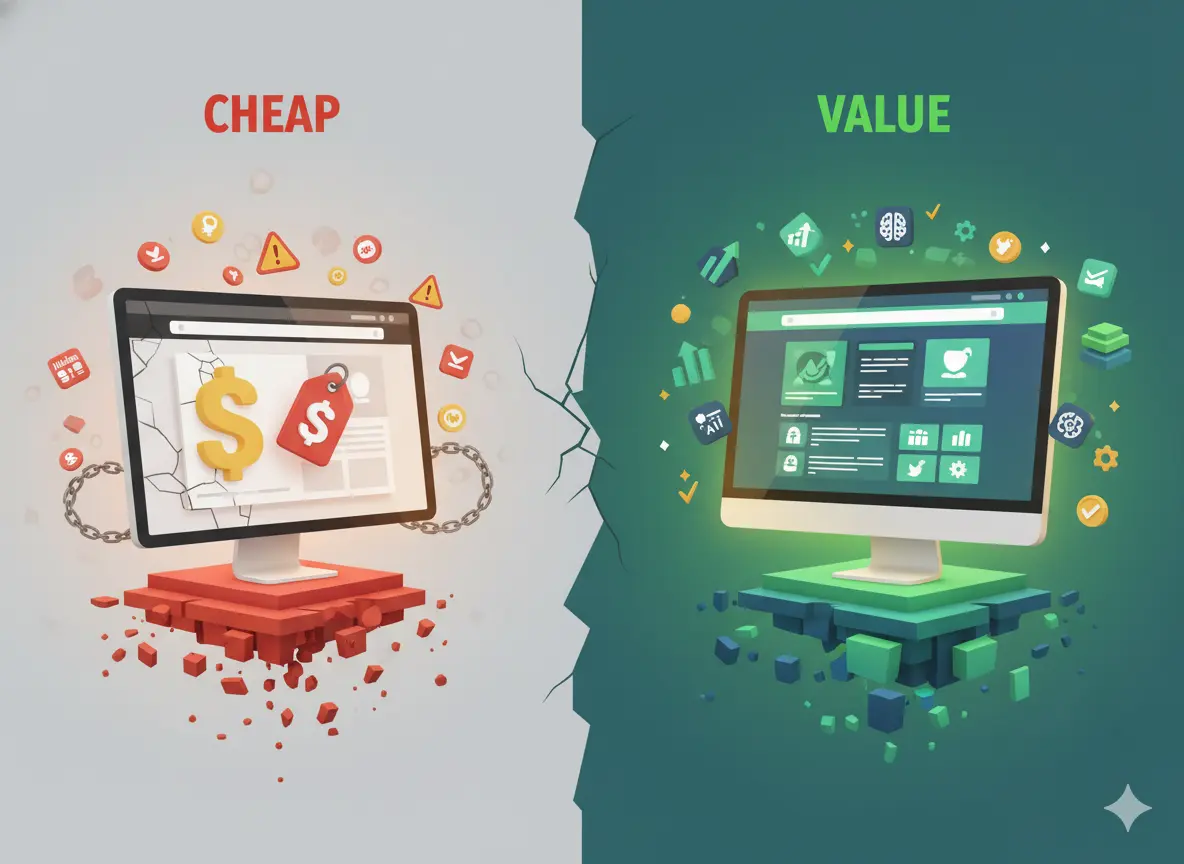
Many beginners choose the cheapest plan or builder to “just get online,” assuming all platforms work the same. While a low upfront cost seems attractive, it can lead to feature limitations, forced upgrades, or migration costs later.
Cheaper doesn’t always mean cost-efficient.
Why is this risky?
• Hidden add-on costs start to appear (apps, plugins, hosting upgrades).
• Low-cost platforms may not support advanced features when you need them.
• Rebuilding later can cost much more than choosing the right platform initially.
Better approach:
View your website as a long-term business asset, not a short-term expense.
2️⃣ Ignoring SEO & Long-Term Growth Potential
Some website builders make it difficult to properly set up SEO, site architecture, schema markup, mobile responsiveness, or fast performance, all of which directly affect your search visibility and lead generation.
Why this matters:
Even a beautiful website won’t produce leads if people can’t find it online.
Signs a platform may not support SEO growth:
• Limited URL structure or metadata control
• Poor mobile responsiveness
• Slow hosting and no caching options
• No schema or advanced SEO plugin support
• Limited blog and category management systems
If your business plans to rely on content marketing, organic search, or inbound leads, prioritize platforms like WordPress or Webflow.
3️⃣ Not Checking Support, Maintenance, or Migration Options
Every website requires updates, fixes, and changes. But not all platforms offer the same level of:
• Customer support
• Troubleshooting resources
• Documentation
• Access to professional experts
• Migration flexibility
Choosing a builder with weak support or closed-system limitations can leave you stuck when you need help.
Why migration matters:
Many drag-and-drop builders do not allow easy exporting, meaning migrating to another platform can require rebuilding the entire site from scratch.
Before choosing, ask:
• How easy is it to get help when needed?
• Are professional experts available at scale?
• Can we migrate the site in the future without major loss?
4️⃣ Choosing a Builder That Cannot Scale With Your Business
Launching a website for today’s needs only is a classic mistake. Your business may later expand into:
• eCommerce
• Multiple locations or service categories
• Multi-language support
• Booking and membership portals
• Automation workflows
• API integrations or custom dashboards
If your chosen website builder cannot grow with you, you will eventually face costly redesigns and technical limitations.
Warning sign: If the builder feels like a quick fix today, it may become a growth blocker later.
When to Hire a Professional vs DIY
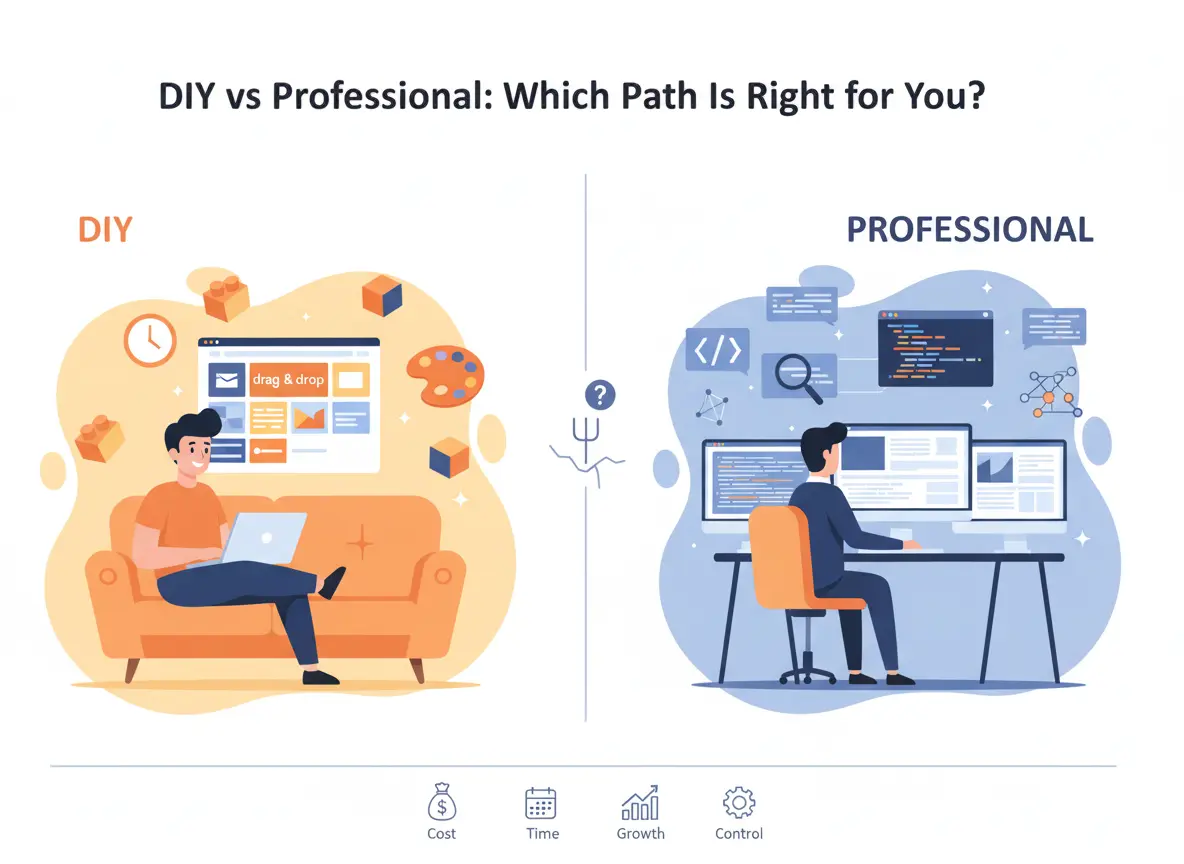
Building a website today is easier than ever, thanks to intuitive drag-and-drop builders and ready-made templates. However, not every business will achieve the same level of performance, branding power, or conversion results using a DIY approach. The decision to build your own website or work with a professional should be based on your business goals, technical comfort, long-term needs, and growth expectations.
You can create your own website; many business owners do. However, hiring professionals becomes crucial when:
• Website affects sales and brand reputation
• Advanced design or features are needed
• SEO & analytics matter
• You want a custom, conversion-focused layout
• You prefer not to manage technical issues
Why Work With Pixwelz LTD
Pixwelz helps businesses plan, design, build, optimize, and maintain websites professionally.
✔ WordPress & Webflow experts
✔ Custom UX/UI - not template-dependent
✔ SEO-optimized structure
✔ Conversion-focused layouts
✔ Maintenance & support available
👉 Get Your Free Website Strategy Session
Ideal for new and growing businesses
Conclusion
Your website is the digital home of your brand, and the platform you choose is the foundation. When making your decision, focus on:
• Business goals
• Long-term scalability
• SEO and performance
• Design flexibility
• Support and maintenance
If you’re still unsure which platform is best for your vision, goals, and future roadmap, you don’t have to decide alone.
Ready to build the right website the right way?
At Pixwelz LTD, we help businesses choose the best platform, design professional websites, and optimize them for branding, performance, and conversions. Whether you want to DIY with expert guidance or hand us the entire build, we are here to support your journey.
.svg)
.svg)
.svg)
.svg)